

People don’t read on the internet; they scan. Here’s how to adjust your writing style.
Key takeaways
Make your writing scannable and start with key information first in order to catch their interest and provide value upfront.
The internet has changed dramatically in the last few decades, yet countless UX studies have shown that one thing has remained the same: people don’t read on the internet.
Writing for the web isn’t the same as writing for a print journal. People tend to approach print publications with a passive, relaxed consumption mindset, while the online environment is much more dynamic: people go on the internet to actively get things done. They’re looking for an answer, an explanation, a source of entertainment or something else. There’s almost always a clear query and a corresponding solution.
So, your job as the writer is to make it possible for users to find that solution as quickly and painlessly as possible. This article will break down how to do it.
Part 1: People don’t read, they scan
The key principle of writing for the internet is scannability.
People don’t read online; they scan for words, phrases and numbers. So, one of the key metrics you should measure your writing by is how easy it is to navigate and scan through.
But how exactly do people scan?
F-pattern
One of the earliest studies on this topic, the 2006 eyetracking study of 232 users showed that people tended towards an F-pattern:
- Horizontal eye movement across the top part of the content
- Another, shorter, horizontal movement
- Vertical movement down on the content’s left side
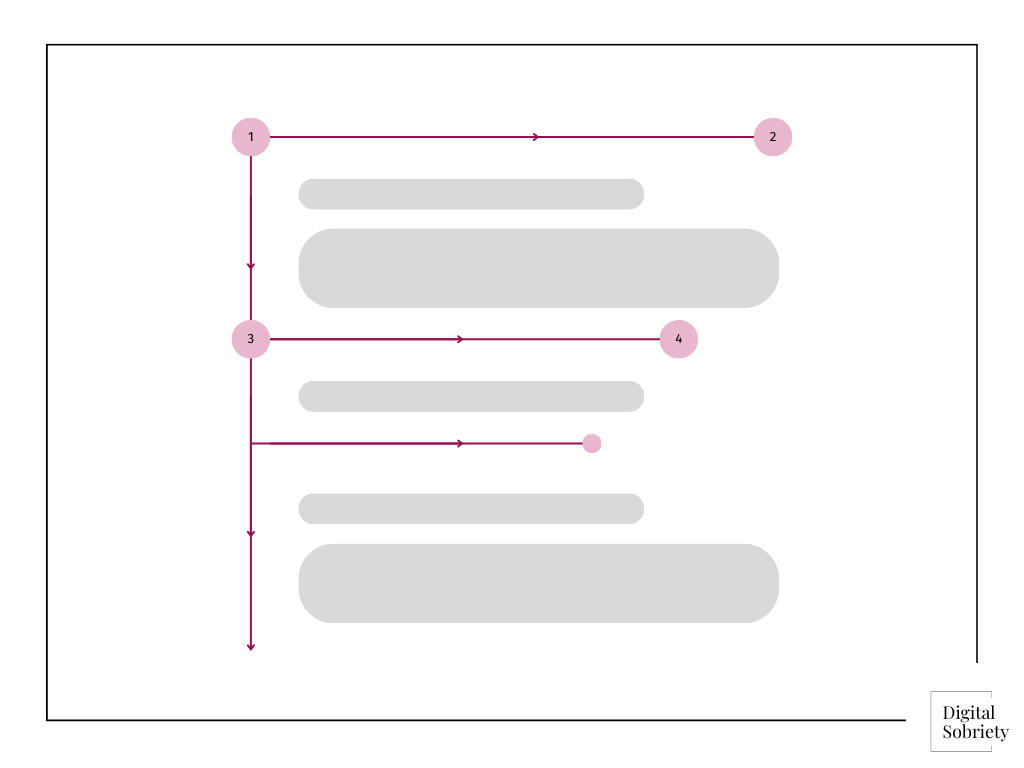
While not all users always used this exact pattern (sometimes it was more like E or L, and the pattern is mirrored in right-to-left languages), the findings were consistent enough to draw broader conclusions on user behavior.
Lawn-mower pattern
As the internet developed, there was a rise in popularity of comparison tables and zigzag layouts (where images and text alternate each row), and with it, a new scanning pattern emerged: the lawn mower pattern.

Layer-cake pattern
The layer-cake pattern is formed when users mainly focus on headings and subheadings, and then occassionally glance upon certain parts of the body text.
This type of scanning is very effective, because it helps users identify which section of the article covers the information they’re searching for.
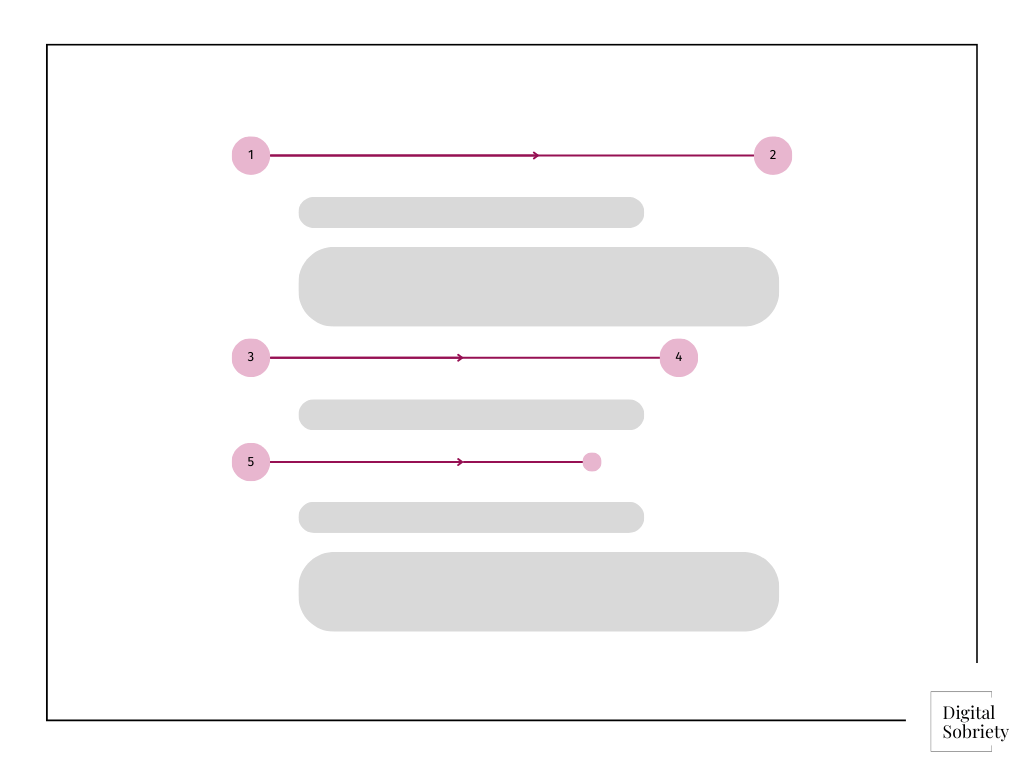
In eyetracking studies, this pattern shows up as a group of horizontal lines with nothing in between them.
There are lots of other reading patterns online, but I’d say that these are the main ones you should keep in mind.
Now let’s see how these insights help us optimize content for better UX.
Part 2: Make your writing scannable
There are lots of ways to make your text scannable, but here are the most effective methods:
| Method | Why |
| Break up your text into sections | Makes it easier to navigate the content |
| Use meaningful headings | Helps users skip irrelevant sections |
| Put key info at the top | Respects users’ time |
| Start lines with key words/phrases | Aligns with how we read on the web |
| Use bullet points | Easier to read and follow lists |
| Highlight key information | Helps with accessibility and usability |
| Add numbers (in numericals) | Text is easier to scan + more trustworthy |
| Be concise | Leads to higher on-page engagement |
Part 3: Front-load your content
The vast majority of people won’t reach the end of the article your worked hard to write. So, get into the habit of presenting the most important information first.
You can front-load content on multiple levels: page, section, paragraph, and even a single line level. But all of it boils down to a fundamental idea:
If the reader only reads one line, what do I want them to know?
Below are a few ideas for how you can front-load your content at multiple levels.
Start with key takeaways
The Inverse Pyramid framework is a story structure where you:
- Cover key “need to know” information first;
- Slowly introduce more “nice to know” details as the article goes on.

This style of writing is perfect for the web because you’re servicing both people that only need the broadest information and those that want to delve into the topic further.
Make content understandable without context
Each line you write should be purposeful and able to stand on its own, without having to rely on previous paragraph for context.
So, as you’re writing your content, imagine that the user will only read a single heading, or just a few words from a paragraph. They should be able to understand your message and the general gist of the section from just a few words.
You can achieve this by:
- Highlighting key information
- Starting your line and paragraph with key words/and phrases
- Rewriting your text so the highlighted parts are fully understandable
- Reducing ambiguity and directional language
Here are a few concrete examples.
| Instead of… | Write this… |
| Introduction | Why Front-Loading Helps Readers |
| “In today’s fast-paced digital world, users often skim content looking for quick answers so it’s important to format your article in a way that aligns with this.” | “Readers scan content, so start with key information.” |
| “Before you send an email, make sure you’ve clarified your main point.” | “Clarify your main point before sending any email.” |
As you’re writing, keep asking yourself these two questions:
- Can I move the end of this sentence to the front?
- Can I turn this heading into a takeaway or benefit?
Part 4: Beyond the blog
You can apply the core principles of scannability and front-loading content in many different contexts, not just web articles.
For example:
| Context | Front-loading content |
| Emails | Put your ask or purpose in the first sentence. |
| Reports | Start with conclusions or key takeaways before details or analysis. |
| Social media posts | Lead with value, insight, or a bold statement — don’t save it for the end. |
| Videos (YouTube, TikTok…) | Hook viewers in the first 3 seconds with the main idea or most interesting point. |
| Resume/CV writing | Start bullet points with action verbs and results — not tasks or context. |
 Digital Sobriety
Leave a comment